Image and video hosting by TinyPic

Wednesday, April 27, 2011

Tamagotchi Color

Hola Como Estas? :D Hey guys, its me Skyzee! Did everyone have a good day? 


I'm here to talk about the not-so-new Tamagotchi Color. Remember Tamagotchi? The old little virtual pet in the shape of an egg? Well NEWSFLASH! They created a one with COLOR. Its an LCD Color screen!
I got one of these in Summer 2010, so they aren't that new.

Right now, my Tamagotchi JUST hatched c: So, another NEWSFLASH.  ALL THE TEXT ON THE TAMAGOTCHI COLOR IS IN JAPANESE.
Yeah. Its in Japanese. I'll be posting a tutorial on how to care for your Tama soon!

NEWSFLASH 3

After tons of research I found the ENGLISH Tamagotchi instructions! 


Hope it helped!

~Skyzee~

Tuesday, April 26, 2011

Peeps Peeps Peeps!

You prolly noticed.... Easter is over :c Sadly... 
But hey, I have some funny pics to share with you guys!


Poor peeps :c


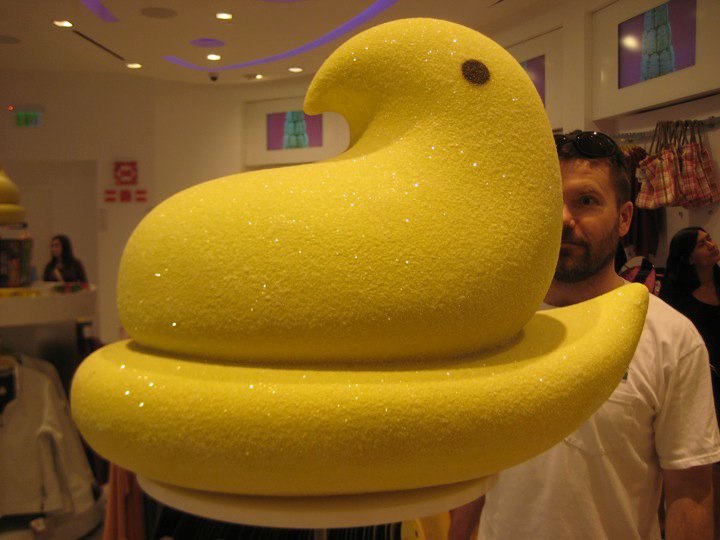
Giant Peep o.o
Hope you guys like 'em! :D

A peep car!


Monday, April 25, 2011

Bubba's New Haircut :D

So yeah, I came from from school today to see my little Bubba lookin' Spiff and Spaz!

Bubba Staring out the window.
He's been moping around and sulking, but I think he just hasn't gotten used to all of us cuddling him because he looks like a pup. Sorry the photo doesn't show you his face, but ya' know, Bubba has a phobia of cameras. It scared the POPTARTS outta him when I took ONE picture with the flash :c 

Thanks for reading!

~Skyzee

Saturday, April 23, 2011

๏ Skyzee's Fuzfee UPDATES! ๏

๏ More Posts (Definitely) ๏ More Tutorials ๏ A new layout ๏ AND MORE!
~Skyzee~

Tuesday, April 19, 2011

Chicky's Habitat

The Chicky's Habitat
This is the habitat!
So, I began creating a habitat for my little arts and crafts easter chick I got at an arts and crafts store! 
Here is the habitat from the top view.
I'll be posting a Tutorial Soon!


Friday, March 18, 2011

To FooPetters:

Hey guys! I was recently trying to help you out on how to make your FooPets webpage purple! 


Very Important: You must have Google Chrome to install this


Step 1:


Go to google.com, and search in Stylish google chrome download:
Click the first one there. (The one labeled Stylish- Google Chrome Extension Gallery)


Step 2:


It will lead you to the download site. Click "Install" The installation process does not take long. 


Step 3:


The "Stylish" icon will appear in the corner of your search bar.


Click it, and this will pop up. Click "Find more styles for this site"


 Step 4:


It will lead you to this:


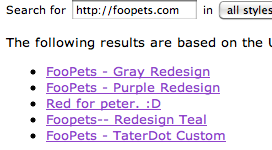
On the search bar at the top, search in "http://Foopets.com"


Step 5:


You'll find all the user submitted Stylish webpage edits. For the purple one, click "Foopets- Purple Redesign." This was by TaterDot.


Step 6:


Click "Install" and you are done!


Thursday, March 10, 2011

๏ Fuzfee UPDATE! ๏

Hey Guys, Zee ish back! 


I recently added a new chat box to the bottom of the website, so go check it out!


Now we can chat together non stop! 8D


To Chat, click "Go Large!" underneath the box!


๏ Zee